


OctaApp - Donate Plasma
4.2749.00 Reviews
App Specs
- Version
- 5.2.1
- Updated On
- License
- Free
- Downloads
- 100,000+
- Developer
- Octapharma Plasma Inc.
- Categories
- Medical
- Platform
- Android
Screenshots
 Analysis by AppCompare
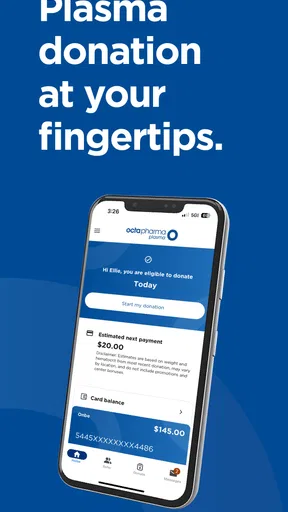
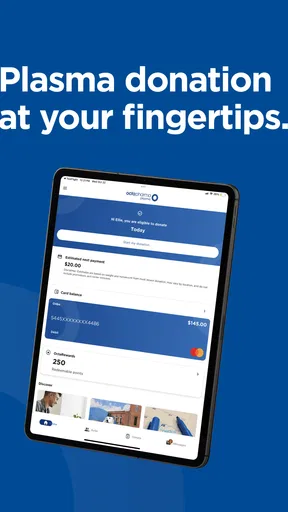
When I’m deciding whether to make plasma donation part of my routine, the first question is practical: how do I keep the appointments, center details, and donation history straight without turning it into another chore? OctaApp - Donate Plasma is meant for Octapharma Plasma donors, and its value is in bringing donation-related information into one place. It is a free medical app from Octapharma Plasma Inc., so I’d think of it as a companion to using that provider rather than a general health tracker or a directory for every plasma center.
That distinction matters before you install it. If you already donate at an Octapharma Plasma location, an app tied to your visits can be more useful than notes scattered across a calendar, email, and phone contacts. If you’re still comparing providers, or only want broad medical guidance, a general search or your clinician may be a better starting point. I would use this app to organize the donation process, not to decide whether donating is medically suitable for me.
Getting Started with OctaApp
First, downloading and setting up OctaApp - Donate Plasma is a breeze. Available on both Android and iOS, it's designed to be user-friendly. Once you've got it installed, you're greeted with an intuitive interface that guides you through the registration process. It feels almost like the app knows exactly what you need before you even realize it.
Signing up requires some basic information, and the app ensures all your data is handled securely. It’s reassuring to see that privacy is a top priority, especially when dealing with sensitive health information.
In ordinary use, I’d treat registration as the first handoff: the app can help organize information, but the donor still needs to provide accurate details and follow the center’s instructions. Take a moment to check that your account information is correct before relying on it to manage visits. For an app connected to health-related activity, that small pause is more useful than rushing through setup and later wondering whether the details you see are current.
Features that Make a Difference
One of the standout features is the app's ability to find donation centers near you. Using location services, it quickly displays a list of nearby centers with all the necessary details like address, contact information, and operating hours. This is perfect for someone like me who’s always on the go and needs to find the closest center.
Additionally, the scheduling function is a lifesaver. Gone are the days of calling up centers to find a spot. With OctaApp, I can see available slots and book my appointments directly through the app. This seamless integration makes the entire process so much more convenient.
Worth Reading Before You Choose

EA SPORTS FC Mobile 26 Is a Bigger Football Game, but It Takes Time

Flipboard Shows What News Apps Must Do Beyond the Feed

Switching to Android Auto Means Rethinking Your Driving Routine

Google Calendar Makes a Crowded Week Easier to Manage

Ludo King Makes the Most of the Minutes Between Plans

Baby Panda World Brings Quick Play to Modern Phones, but Its Game Library Feels Busy
A useful habit is to check the center information again before setting out, especially if I’m visiting a location I don’t know well. A map result can get me to the right area, but planning still means allowing time for travel and checking that the appointment fits the rest of my day. I would keep the center’s contact details available as a backup rather than assuming every change can be handled inside the app.
For example, imagine I have a free afternoon between errands and want to donate without spending it making calls. I can look for a nearby center, compare the appointment options shown, and choose a slot that leaves enough time for the trip and the visit. The app can reduce the back-and-forth, but I still need to arrive prepared and confirm any center-specific instructions directly when needed. That division of labor is sensible: the phone helps with planning, while the donation center handles the in-person process.
Tracking and Rewards
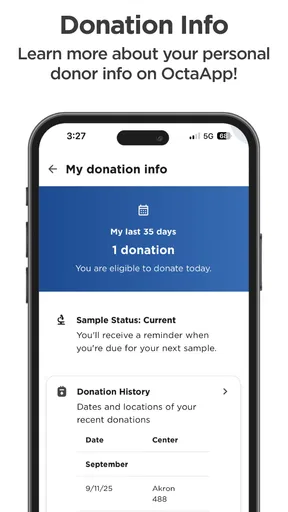
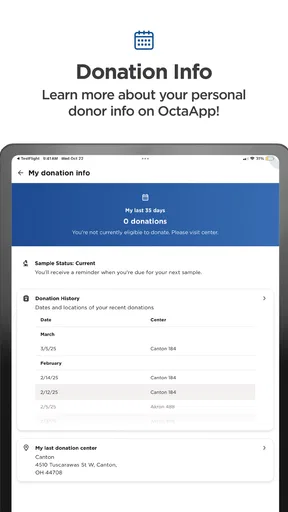
Another cool feature is the app's tracking system. It keeps a detailed log of your donation history, including dates, locations, and even your health stats from each donation. For someone who likes to keep track of personal achievements, this is a fantastic addition.
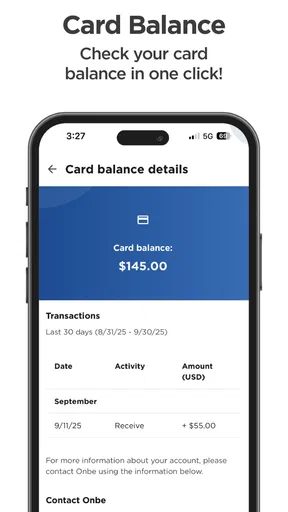
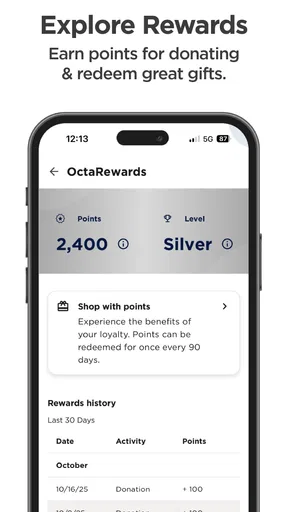
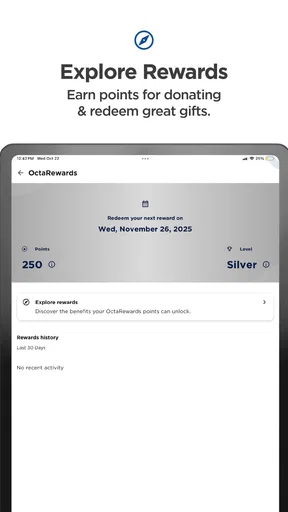
But wait, it gets better! The app also offers a rewards system. As you donate more, you earn points that can be redeemed for various rewards. It’s a great way to motivate donors and make them feel appreciated. After all, who doesn’t like a little reward for doing good?
The history is most useful as a personal reference, not as a substitute for medical records or professional advice. I’d check it after a visit to keep a clear sense of my own donation timeline, then contact the center if something important looks wrong or needs clarification. That approach avoids treating an app screen as the final authority on eligibility, health questions, or a center’s decision about a visit.
Rewards can make repeat visits feel more tangible, but I wouldn’t let points decide whether or when to donate. The better trade-off is to see them as a small extra attached to a routine that already works for your schedule and health. If the motivation is purely the reward, it’s worth stepping back and making sure the commitment still feels comfortable rather than booking more often simply to collect benefits.
Educational Resources
For those who are new to plasma donation, the app provides a wealth of educational resources. Whether it’s understanding the health benefits of donating plasma or learning about the donation process itself, OctaApp has got you covered. The resources are easy to navigate and written in a way that’s accessible to everyone.
I found the FAQs section particularly helpful. It answered all the burning questions I had when I first started donating, like what to expect during a session and how to prepare. Plus, the community forum is a nice touch, allowing users to connect and share their experiences.
I’d use those learning materials to get oriented before a first visit, then bring any personal medical concerns to a qualified professional or the center staff. Other donors can offer helpful perspectives about what a visit felt like for them, but their experiences are not a dependable guide to someone else’s eligibility or health. That boundary is important in a medical setting: peer conversation can ease uncertainty, while individual questions need an appropriate professional answer.
Where the Routine Needs a Backup
The app is most compelling when the whole chain stays in one place: find a center, arrange a visit, keep track of donations, and review relevant guidance. The weak point is that a phone-based workflow still depends on the donor and the center staying in sync. If plans change, a detail seems outdated, or a question affects whether I should attend, I would contact the center rather than assume the app can resolve it. Convenience is valuable, but it does not remove the need for direct communication.
There is also a practical difference between a dedicated donor app and the usual alternatives. A calendar can remind me of an appointment, and a notes app can store an address or personal checklist, but I would have to maintain those details myself. A general map can help with directions yet won’t serve as a tailored record of my donation activity. For an Octapharma Plasma donor, a single provider-focused tool is a cleaner fit; for someone who uses several providers or wants one place for all health records, separate tools may be more appropriate.
On Android, the app is listed for devices running version 7.0 or later, and its current release is version 5.1.0. Its age rating is Everyone, which makes the stated content classification broad, though the service itself is specifically useful to people managing plasma donations. It has passed 100K installs and holds an average rating of 4.5 from around 1.4K ratings, with 605 written reviews. I see those figures as a sign that people are using and assessing it, not a guarantee that every center visit or device experience will be friction-free.
Who Will Get the Most from It
I’d recommend it most to someone who already visits Octapharma Plasma and wants fewer loose ends around appointments and personal donation history. It can also suit a first-time donor who wants an organized place to begin learning and planning, as long as they understand that reading in an app does not replace speaking with the center about individual requirements. People who prefer to make arrangements by phone can still do that; the app is a convenience, not a reason to use a process that feels uncomfortable.
I’d be less enthusiastic if I were looking for a universal plasma-donation directory, an all-purpose medical record, or a tool that independently answers personal eligibility questions. Its provider-specific focus is its strength for the right user and its limit for everyone else. Before depending on it, I’d also make sure my device can run the current version and that I can access my account when I need it; keeping essential appointment details somewhere accessible is a sensible backup for any digital organizer.
Why I Love Using OctaApp
What I appreciate most about OctaApp is how it simplifies the donation process while keeping it personal and engaging. The app truly feels like a community, encouraging users to continue donating by making the experience rewarding and informative.
Moreover, the app’s developers seem to genuinely care about their users. Regular updates ensure the app runs smoothly, and any technical issues are swiftly addressed. It's clear they’re committed to providing the best possible experience for donors.
For my own routine, the best result would be less time spent piecing together logistics and a clearer record to refer to after a visit. I’d still keep ordinary judgment in the loop: double-check the plan before travelling, use the center for questions that need a direct answer, and treat donation history as a helpful reference rather than medical advice. Used that way, the app supports the real-world process without pretending to replace it.
In conclusion, if you’re considering donating plasma or already a seasoned donor, OctaApp - Donate Plasma is an invaluable tool. It takes the hassle out of scheduling, keeps you informed, and rewards you for your contributions. So, why not give it a try? Download it today and start making a difference!
Pros
- User-friendly interface
- easy navigation.
- Comprehensive donation tracking system.
- Integrated appointment scheduling.
- Informative FAQs and guidance.
- Secure data handling and privacy.
Cons
- Limited to specific donation centers.
- Requires stable internet connection.
- Notifications can be overwhelming.
- No offline mode available.
- Occasional app crashes reported.
FAQs for OctaApp - Donate Plasma
What is OctaApp - Donate Plasma used for?
OctaApp - Donate Plasma is designed to facilitate the process of donating plasma. It helps users find donation centers, schedule appointments, track donation history, and access important health and eligibility information, all from their smartphone. The app aims to streamline the donation process and make it more convenient for donors.
How do I schedule an appointment through OctaApp?
Scheduling an appointment with OctaApp is straightforward. After logging in, users can select a nearby donation center, view available time slots, and choose a convenient time for their donation. The app sends reminders and allows users to easily reschedule if needed, ensuring a seamless experience.
Is my personal information safe on OctaApp?
Yes, OctaApp prioritizes user privacy and data security. The app uses encryption and other security measures to protect personal and medical information. Users can review the privacy policy within the app to understand how their data is handled and ensure it complies with relevant regulations.
What are the eligibility requirements for donating plasma through OctaApp?
Eligibility requirements for plasma donation vary, but generally include being in good health, meeting age and weight criteria, and passing a medical screening. OctaApp provides detailed information on eligibility and guides users through the necessary steps to ensure they are qualified to donate.
Does OctaApp provide any incentives for plasma donation?
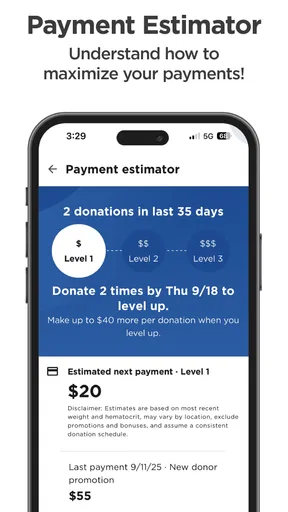
Many donation centers offer incentives for plasma donation, which may include monetary compensation or rewards. OctaApp helps users keep track of these incentives and any available promotions. However, specifics can vary by location and user, so it's best to check directly within the app or with the donation center.


